Що таке G-Code: Введення в програмування верстатів з ЧПУ
Зміст
Що таке G-код? У світі сучасного виробництва точність має першорядне значення. Сектори від аерокосмічної галузі до прототипування медичних виробів залежать від бездоганного виконання складних конструкцій. Це виконання здійснюється автоматизованими робочими конячками, такими як верстати з комп'ютерним числовим програмним управлінням (CNC) і 3D-принтери. Однак ці потужні машини не розуміють візуальних конструкцій або абстрактних концепцій. Їм потрібна точна мова на основі інструкцій для функціонування. Цією мовою є G-код. Розуміння "що таке G-код" є важливим для будь-кого, хто займається виробництвом, інженерією або дизайном. Ця стаття містить остаточне пояснення G-коду, детально описуючи його призначення, структуру, робочий процес і важливі команди, які перетворюють цифрові креслення на фізичні об'єкти. Швидке прототипування металу змінило спосіб розробки продуктів, дозволяючи дизайнерам і інженерам створювати високоточні металеві прототипи з безпрецедентною швидкістю. Незалежно від того, чи це автомобільна, аерокосмічна чи споживча продукція, ця передова методологія пропонує значні переваги, від економії коштів до скорочення термінів виробництва. У цій статті ми розглянемо інструменти, методи та переваги швидкого прототипування металу, що робить його цінним ресурсом для всіх, хто займається виробництвом або розробкою продуктів.

Що таке G-код? Основне визначення
G-код - це основна мова, яку люди використовують для інструктування верстатів з ЧПУ та 3D-принтерів. "G" в G-коді означає "Геометричний", оскільки мова в основному описує геометрію траєкторії інструменту. Розглядайте це як набір прямих, детальних вказівок. Ці інструкції повідомляють головці пристрою машини конкретно, куди рухатися, як швидко рухатися і якого курсу дотримуватися.
Ця мова працює в декартовій системі координат, використовуючи осі X, Y і Z для визначення розміщення в тривимірному просторі. Команди G-коду, також відомі як підготовчі коди, визначають кожен рух. Крім простого позиціонування, G-код також контролює важливі змінні. До них відносяться швидкість подачі (швидкість просування ріжучого інструменту), швидкість обертання (швидкість обертання інструменту) і вибір конкретних інструментів, необхідних для завдання.
G-код рідко працює сам по собі. Він функціонує в тандемі з M-кодом, або "різним кодом". У той час як команди G-коду управляють рухами обладнання, команди M-коду управляють допоміжними функціями обладнання. До них відносяться перетворення охолоджуючої рідини у включений або вимкнений стан, початок або зупинка програми, а також запуск зміни пристрою. Разом G-код і M-код формують повну програму, яка направляє машину від її початкової точки до готового компонента.
Історичне коріння G-коду
Історія G-коду починається в 1950-х роках в Лабораторії сервомеханізмів Массачусетського технологічного інституту (MIT). У той час раннє обладнання з числовим програмним управлінням (NC) покладалося на фізичну перфоровану стрічку для інструкцій, складну і негнучку систему. Розробка G-коду була інноваційним кроком, що розробив стандартизовану текстову мову для управління рухом машини.
Його поширене прийняття, однак, було доступне в 1960-х роках. Альянс електронної промисловості (EIA) стандартизував мову під класифікацією RS-274. Ця стандартизація була важливою віхою. Він розробив глобальну основу, на якій можуть будувати виробники інструментального обладнання. Це дозволило забезпечити більшу сумісність між різними пристроями та програмними системами. Ця важлива розробка проклала шлях до революції ЧПУ, перетворивши виробництво з ручного ремесла на дуже автоматизовану, точну науку.
Чому G-код має вирішальне значення в сучасному виробництві
Виробники, за своєю природою, не є інтелектуальними. А Механічна обробка з ЧПУ об'єкт володіє потужними серводвигунами і точними приводами, однак він вимагає чітких вказівок для виконання будь-якого завдання. G-код служить важливим мостом між електронним дизайном, створеним в програмному забезпеченні, і фізичними діями виробника. Він перетворює абстрактний намір інженера або дизайнера в конкретний, дієвий набір команд, які контролер обладнання може розпізнати і реалізувати.
Важливість G-коду залежить від трьох важливих областей:
- Автоматизація: G-код дозволяє складним процесам обробки працювати від початку до завершення з мінімальним втручанням людини. Це є основою для масового виробництва та продуктивності в таких секторах, як автомобільне прототипування.
- Точність: Мова дозволяє переміщення, зазначені до тисячних часток дюйма (або мікрометрів). Цей рівень точності важко досягти постійно вручну і він необхідний для деталей з високим допуском.
- Повторюваність: Після того, як програма G-коду буде вдосконалена, обладнання може виконувати її тисячі разів, виробляючи ідентичні деталі щоразу. Ця послідовність є основою сучасного контролю якості.
Without G-code, the production of intricate elements for whatever from customer electronic devices to commercial equipment would be slower, more pricey, and much less trusted.
The G-Code Workflow: From Digital Design to Physical Part
Producing a finished part with a CNC device involves a structured, multi-stage procedure. The G-code script is the last outcome of the pre-production process. Right here is just how it functions.
1. Computer-Aided Design (CAD) The process starts with a concept. An engineer or designer develops a 2D drawing or 3D strong model of the preferred component utilizing CAD software program. This electronic plan specifies all the geometric attributes, measurements, and tolerances of the end product.
2. Computer-Aided Manufacturing (CAM) Next, the CAD data is imported into CAM software program. This is where the manufacturing strategy is established. The CAM software driver specifies the sort of basic material, picks the proper cutting tools, and sets machining specifications like reducing speed and depth. The software application then uses this info to determine one of the most effective toolpaths to develop the part. Its main outcome is a G-code program that translates these toolpaths right into machine-readable guidelines.
3. Post-Processing The G-code created by a CAM program is frequently common. Different brands of CNC machines (like Haas, Fanuc, or Siemens) talk slightly different “languages” of G-code. A post-processor is a tiny software program energy that functions as a translator. It converts the common CAM outcome into a particular G-code file formatted completely for the target equipment’s controller. This step is vital to stop errors and guarantee compatibility.
4. Device Execution The finalized G-code documents is moved to the CNC device’s controller, usually by means of USB or an ethernet connection. The maker operator sets up the work surface and tools. Once the program starts, the maker’s controller reviews the G-code one line, or “block,” each time. It analyzes each command and sends out electrical signals to the maker’s motors and systems, driving the device along the programmed course to reduce, drill, or shape the part.
Deconstructing G-Code: Understanding Its Structure
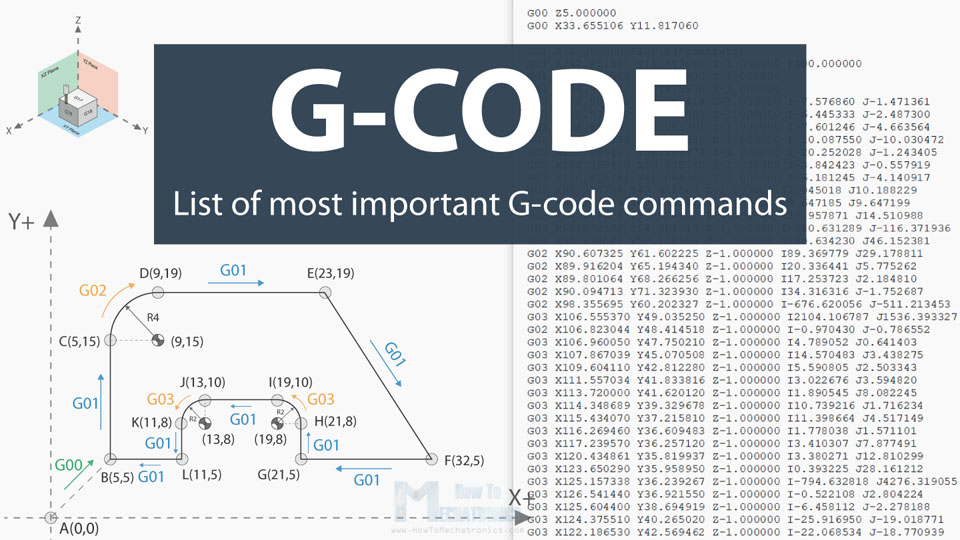
At first glance, a G-code file may look like a confusing assortment of letters and numbers. Nonetheless, it follows a rational and consistent framework. The program includes a series of lines, called blocks. Each block has several commands, known as words. A word is just a letter followed by a number. The maker executes the blocks sequentially from top to bottom.
Let’s evaluate an example block of G-code: N100 G01 X50.0 Y25.5 Z-5.0 F150 S1200 M03
- N100: The block number (N). This aids arrange the program and makes it easier to find specific lines.
- G01: A G command. This is a preparatory command telling the maker to carry out a details sort of movement– in this instance, a linear feed move.
- X50.0 Y25.5 Z-5.0: The coordinate data. These words tell the equipment the endpoint for the action along the X, Y, and Z axes.
- F150: The feed price (F). This instructs the maker to move at a price of 150 units (e.g., mm/minute) throughout the cut.
- S1200: The pin speed (S). This establishes the rotational speed of the reducing device to 1200 transformations per min (RPM).
- M03: An M command. This is a miscellaneous command that tells the spindle to start kipping down a clockwise instructions.
The following table summarizes the most typical address characters located in G-code.
Table 1: Common G-Code Address Characters
| Character | Ім'я | Мета |
|---|---|---|
| G | Preparatory Command | Defines the type of motion or operation (e.g., rapid move, linear cut, drilling cycle). |
| M | Miscellaneous Function | Controls auxiliary machine functions (e.g., coolant on/off, program stop, tool change). |
| X, Y, Z | Linear Axes | Specifies the target coordinates for motion along the primary three axes. |
| A, B, C | Rotational Axes | Specifies the target coordinates for rotational axes around X, Y, and Z, respectively. |
| F | Feed Rate | Sets the speed at which the cutting tool moves through the material. |
| S | Spindle Speed | Sets the rotational speed of the machine’s spindle in RPM. |
| T | Вибір інструменту | Instructs the machine to select a specific tool from its turret or magazine. |
| N | Block/Line Number | Provides a sequence number for a line of code, used for organization and reference. |
| I, J, K | Arc Center Data | Defines the center point of an arc when using G02 or G03 commands. |
Common G-Code Commands You Must Know
While there are hundreds of G-code commands, a handful form the foundation of nearly every CNC program. An operator or programmer who understands these core commands can read and interpret most G-code scripts.
Table 2: Essential G-Code Commands and Their Functions
| Command | Ім'я | Опис |
|---|---|---|
| G00 | Rapid Positioning | Moves the tool at the machine’s maximum travel speed to a specified coordinate. This is used for non-cutting movements to save time. |
| G01 | Linear Interpolation | Moves the tool in a straight line to a specified coordinate at a defined feed rate (F). This is the primary command for cutting material. |
| G02 | Clockwise Circular Interpolation | Moves the tool along a clockwise arc. Requires specifying the endpoint and the arc’s center or radius. |
| G03 | Counter-Clockwise Circular Interpolation | Moves the tool along a counter-clockwise arc. Similar to G02 but in the opposite direction. |
| G21 | Millimeter Units | Sets the machine’s interpretation of all dimensional values to millimeters. |
| G90 | Absolute Positioning | Interprets all coordinate values as positions relative to a fixed program zero point (the origin). This is the most common mode. |
| G91 | Incremental Positioning | Interprets all coordinate values as distances relative to the tool’s current position. |
| G81 | Drilling Cycle | A “canned cycle” that automates the standard process of drilling a hole to a specified depth and retracting. |
| G41/G42 | Cutter Radius Compensation | Automatically adjusts the toolpath to the left (G41) or right (G42) to compensate for the radius of the cutting tool. This ensures the final part dimensions are accurate. |
Understanding these commands is the first step to G-code literacy. For example, G00 X100 Y100 quickly repositions the tool, while G01 X100 Y100 F200 moves it to the same spot slowly and carefully, performing a cut.
G-Code vs. M-Code: Clarifying the Difference
A common point of confusion for newcomers is the distinction between G-codes and M-codes. While they work together in the same program, they have fundamentally different roles.
G-Codes (Geometric Codes): These are action commands that control the movement and operation of the tool. They answer the questions “Where is the tool going?” and “How should it get there?”. They manage the geometry of the part being created, controlling everything from straight lines and arcs to complex canned cycles for глибоке штампування металу.
M-Codes (Miscellaneous Codes): These are switching commands that control the non-geometric functions of the machine itself. They act like on/off switches for hardware. They answer questions like “Is the coolant on?” or “Is the spindle spinning?”.
In short: G-code moves the tool; M-code runs the machine. A program needs both to function. For example, a line might use G01 to start a cut while simultaneously using M08 to turn on the flood coolant to keep the tool and workpiece from overheating.
A Practical G-Code Example: Machining a Simple Square
To see how these commands work together, let’s examine a simple G-code program designed to mill a 20mm x 20mm square, cutting 1mm deep into a workpiece.
G21 ; Встановити всі одиниці до міліметри. Вирішальний перший крок за ясність. до абсолютний. Усі координати будуть відносний до "У нас тут є початок координат (X0 Y0). "У нас тут є інструмент до a безпечна висота з 5мм над "У нас тут є заготовкою. "У нас тут є інструмент до "У нас тут є початковий кут з "У нас тут є квадрат.-1 F100 ; Опустити "У нас тут є інструмент в "У нас тут є матеріал до a глибина з 1мм за адресою a швидкість подачі з 100 мм/хвилину. "У нас тут є перший сторона з "У нас тут є квадрат на переміщення до X=20 за адресою a швидкість подачі з 200 мм/хвилину. "У нас тут є другий сторона на переміщення до Y=20. Швидкість подачі залишається 200.
G01 X0 ; Cut "У нас тут є третій сторона на повернення назад до X=0.
G01 Y0 ; Cut "У нас тут є кінцева сторона, повернення до "У нас тут є початок точка. "У нас тут є інструмент назад вгору до "У нас тут є безпечна висота. кінець і скидання. Це M-код сигнали "У нас тут є машина що "У нас тут є робота це завершено.
This simple example demonstrates how a sequence of G-code and M-code commands can produce a precise geometric shape.
Troubleshooting Common G-Code Errors
While web cam software program produces extremely trusted G-code, mistakes can still happen. Understanding just how to fix them is a valuable ability for any machine driver.
- Syntax Errors: These are straightforward typos, like creating G1 as opposed to G01 or neglecting a needed value like the feed price. A lot of contemporary CNC controllers will detect syntax errors and stop the program with an alarm system, showing the troublesome line.
- Sensible Errors: The code is syntactically appropriate however commands the device to do something harmful or incorrect. An usual example is commanding a rapid move (G00) with the product rather than a feed step (G01), which can damage the device or damage the part.
- Post-Processor Errors: The code contains commands that the particular device controller does not acknowledge. This takes place when the wrong post-processor is made use of and is a suggestion of why that action is so crucial.
The very best way to stop these mistakes is to use a G-code simulation software. These programs, like NC Viewer, develop a digital rendering of the toolpath, allowing you to enjoy the whole program run on a screen prior to you cut any type of steel. This aids capture collisions, ineffective paths, and sensible errors before they create expensive damage.
The Broad Spectrum of Machines Using G-Code
G-code’s influence extends far beyond a single type of machine. It is the de facto standard for a vast range of computer-controlled equipment across multiple manufacturing disciplines.
- Subtractive Manufacturing: This is G-code’s traditional domain. It includes CNC milling machines that use rotating tools, CNC turning lathes that rotate the workpiece, and grinders for finishing surfaces.
- Fabrication and Cutting: Machines that cut shapes from flat stock heavily rely on G-code. This includes лазерні різаки, plasma cutters, and high-pressure waterjet cutters.
- Additive Manufacturing: 3D-принтери, which build parts layer by layer, also run on G-code. When you “slice” a 3D model, the slicer software generates a G-code file that controls the print head’s movement (X, Y), the layer height (Z), and the material extrusion rate.
This universality makes G-code a transferable skill across many areas of промислове прототипування and production.
Висновок
G-code is more than just a programming language; it is the fundamental link between digital innovation and physical reality. It provides the precise, unambiguous instructions that allow automated machines to build our world with unparalleled speed and accuracy. While modern CAM software handles the heavy lifting of generating complex G-code programs, a solid understanding of “what is G-code” remains an invaluable asset. For engineers, machine operators, and hobbyists alike, literacy in G-code empowers them to optimize processes, troubleshoot problems, and unlock the full potential of CNC technology. In the ongoing evolution of manufacturing, G-code stands as an enduring and essential tool.
Suggested External Links for Insertion
- For General Reference: Autodesk’s Guide to G-Code – An excellent, authoritative overview from a leading software provider.
- For Technical Details: LinuxCNC G-Code Documentation – A highly detailed technical reference for a wide range of G- and M-codes.
- For Practical Visualization: NC Viewer – A free, web-based G-code simulator that allows users to paste their code and see a visual representation of the toolpath.
- For Manufacturer-Specific Info: Haas Automation’s Resource Center – Provides practical tips and information specific to one of the most popular CNC machine brands.
Коментарі
Останні публікації
Пов'язані блоги
Блог Senyo зосереджений на тому, щоб поділитися нашими глибокими знаннями у сфері виробництва прототипів. За допомогою наших статей ми прагнемо допомогти вам удосконалити дизайн вашого продукту та ефективніше розібратися зі складнощами швидкого прототипування.

Чому виробники деталей з нержавіючої сталі мають вирішальне значення?
18 березня 2025 року
Читати далі »